Part Properties
Select a part on the canvas (with the Select tool 
 ) and the Part properties panel shows its details on the right. Most parts nest well on the defaults, but this panel lets you give an individual part special treatment.
Editing the shape
At the top you can open the part for editing:
- Edit shape for a library part, to change its parameters.
- Edit drawing for a part you drafted or imported, to open it in the CAD editor.
Changing a part removes any copies already placed on the sheet, so run the nest again afterwards to refill them.
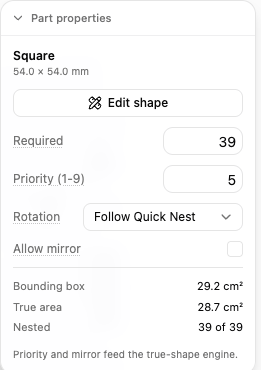
Settings for this part
- Required - how many of this part you need. The nester keeps placing it until it reaches this count or runs out of sheets. This is the same value as the quantity in the Part List.
- Priority (1-9) - which parts get placed first. Lower numbers go down before higher ones, so give the parts you must have a low priority and let filler parts take what is left. Placing important parts first means they land on the good middle of the sheet.
- Rotation - which angles this part may be turned to while nesting. Leave it on Follow Quick Nest to use the setting from the Nest dialog, or pick a specific rule to pin this part: None (grain locked), 0, 180, 0, 90, 0, 90, 180, 270, or Free (15° steps). Once you pin a part, Quick Nest changes no longer affect it. See Rotation and Orientation.
- Allow mirror - let the nester flip the part over to pack tighter. Only use this where the material has no top side and the part has no handedness, otherwise a mirrored part is the wrong part.
Read-outs
The panel also reports facts about the part:
- Bounding box - the area of the rectangle around the part.
- True area - the actual area of the part’s outline, which is smaller than the bounding box for anything that is not a rectangle. The gap between the two is what true-shape nesting recovers.
- Nested - how many copies are currently placed, out of the total you need.